Integrating Create Dreams into Your Visual Workflow
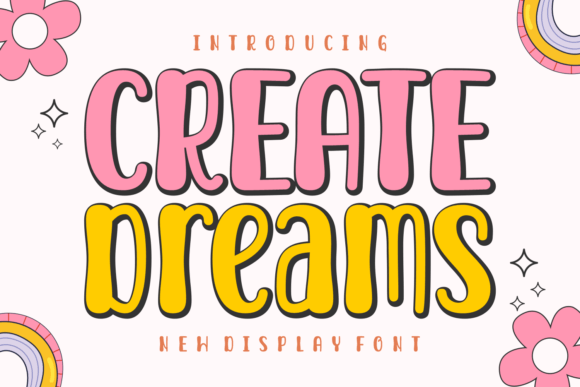
In the crowded landscape of digital design, typography is often the first element that determines whether a viewer engages with content or scrolls past it. While body text requires neutrality and readability, display fonts serve a different function entirely: they establish tone, evoke emotion, and command attention. Create Dreams enters this space not merely as a typeface, but as a strategic asset for designers, marketers, and creators who need their headlines to resonate with an unmissable echo. This enchanting and playful display font is designed to sprinkle a bit of magic into your designs, offering a bold, unique personality that stands out in both print and digital media.
Understanding how to effectively incorporate Create Dreams into your existing workflow requires more than just installing the font file. It demands a clear understanding of where high-impact typography fits within the broader creative process. Whether you are designing mesmerizing posters, crafting compelling social media graphics, or developing brand identities for small businesses, this font serves as a catalyst for visual interest. By examining its application before, during, and after key project phases, you can maximize its potential while maintaining professional consistency and quality control.
Strategic Placement in the Design Process
The decision to use a distinctive display font like Create Dreams should occur early in the planning stage, ideally during the concept development phase. Before opening any design software, consider the emotional trajectory of your project. If the goal is to convey whimsy, creativity, or approachability, this font aligns perfectly with those objectives. However, its integration must be deliberate. Using it sparingly ensures that its "magic" remains potent rather than becoming visual noise.
During the execution phase, Create Dreams interacts dynamically with other design elements. It pairs exceptionally well with clean, sans-serif body fonts that provide a neutral backdrop, allowing the display type to shine without competition. For instance, when creating a promotional poster for a local art fair or a workshop, use Create Dreams for the main headline to capture immediate attention. Then, rely on a highly legible font for the date, time, and location details. This hierarchy guides the viewer’s eye logically through the information, ensuring that the playful aesthetic does not compromise usability.
Furthermore, consider the medium. In digital workflows, such as web banners or email headers, test the font’s rendering across various devices. While Create Dreams is optimized for clarity, its intricate details may require slight adjustments in tracking or scaling when viewed on smaller screens. This attention to technical detail during the implementation phase prevents common pitfalls associated with decorative typography, ensuring a seamless user experience.
Enhancing Brand Identity and Marketing Materials
For entrepreneurs and small business owners, consistency is key to building brand recognition. Create Dreams can serve as a cornerstone of your visual identity, particularly if your brand values creativity, innovation, or playfulness. When integrating this font into your marketing arsenal, focus on specific touchpoints where emotional connection is paramount. Product packaging, event invitations, and limited-edition campaign materials are ideal candidates for this typeface.
Consider a scenario where a boutique coffee shop launches a seasonal blend. Using Create Dreams on the bag’s label immediately signals a special, curated experience. The font’s lively character suggests that the product is not just a commodity but a delightful treat. This psychological cue influences purchasing decisions, demonstrating how typography directly impacts business outcomes. To maintain efficiency, create a style guide that defines exactly how and where Create Dreams should be used. Specify minimum sizes, color pairings, and spacing rules. This documentation streamlines future projects, allowing freelancers or team members to apply the font consistently without constant supervision.
Additionally, this font enhances social media engagement. In a feed dominated by uniform aesthetics, a post featuring Create Dreams breaks the pattern, encouraging users to stop and read. Use it for quote graphics, announcement headers, or celebratory messages. The key is balance; overuse can dilute its impact. By reserving it for high-value content, you ensure that each appearance feels intentional and fresh.
Practical Implementation Tips for Creators
To get the most out of Create Dreams, adopt a methodical approach to its application. Here are several practical strategies to integrate this font smoothly into your daily routine:
- Hierarchy Management: Always prioritize readability. Use Create Dreams exclusively for headings, titles, or short phrases. Avoid using it for long paragraphs, as its decorative nature can strain the reader’s eyes over extended text blocks.
- Color Contrast: This font thrives in high-contrast environments. Pair it with solid, bold backgrounds to make the letters pop. Experiment with gradient overlays or subtle shadows to add depth, but ensure the text remains legible against complex images.
- Spacing and Kerning: Display fonts often require manual adjustment of letter spacing. Take the time to tweak kerning pairs in your design software to ensure even visual weight. This small step significantly elevates the professional quality of the final output.
- Contextual Testing: Before finalizing any project, view your design in its intended context. Print a proof if it is for physical media, or preview it on multiple devices if it is digital. Check how Create Dreams interacts with surrounding elements and adjust accordingly.
These steps may seem minor, but they collectively contribute to a polished, cohesive result. By treating typography as a functional component of your workflow rather than an afterthought, you enhance the overall effectiveness of your communication.
Compatibility and Long-Term Utility
One of the strengths of Create Dreams is its versatility across various platforms and file formats. Whether you are working in Adobe Illustrator, Photoshop, Canva, or open-source alternatives, this font integrates seamlessly into standard design ecosystems. For educators and publishers, it offers a reliable tool for creating engaging educational materials, book covers, or classroom posters that capture students' interest without appearing childish.
From a long-term perspective, investing in a high-quality display font like Create Dreams reduces the time spent searching for suitable typography for each new project. Instead of browsing endless free font libraries with inconsistent quality, you have a trusted resource ready for deployment. This efficiency allows you to focus more on conceptual development and less on asset hunting. Moreover, because the font has a distinct personality, it helps differentiate your work in a saturated market, providing a competitive edge for freelancers and agencies alike.
When organizing your digital assets, store the font files in a centralized, backed-up location. Label them clearly with version numbers and licensing information to avoid legal issues or confusion during collaborative projects. Proper organization ensures that you can access Create Dreams quickly whenever inspiration strikes, keeping your creative momentum uninterrupted.
Conclusion: Elevating Your Creative Arsenal
Create Dreams is more than just a collection of letters; it is a tool for expression that bridges the gap between idea and execution. By understanding its role in your workflow, respecting its limitations, and leveraging its strengths, you can inject life into your creative initiatives. From mesmerizing posters to compelling headlines, this font ensures your thoughts resonate with clarity and charm. Embrace the unlimited creative potential it offers, and let your designs speak with a voice that is impossible to overlook. As you continue to refine your process, remember that the right typography does not just decorate your work—it defines it.